
Allergy menu
software for
restaurants.
Give guests a digital allergy menu they can explore by allergy. Keep dish details, possible modifications, and cross-contact notes together, then share your menu by link or QR code.
 Less guesswork. More hospitality.

Clear information keeps us connected.
 Allergen information
A little clarity.
A lot of confidence.
From the first scan to the last bite, thoughtful information makes a difference. Give your guests and staff a clearer place to start.
Build your menu.
Review every dish.
Create a digital allergy menu, maintain kitchen-reviewed dish details, and explore our AI-assisted menu import preview.
Allergy menu builder 02 / THE INFORMATIONKeep allergy
information current.
Organize dish-level allergy information and cross-contact notes where your team manages the menu.
Allergen management 03 / THE CONNECTIONOne simple scan.
A more informed guest.
Share a menu link or QR code. Guests can explore on their own phones, without creating an account.
QR code menusYour menu photo.
A reviewable first draft.
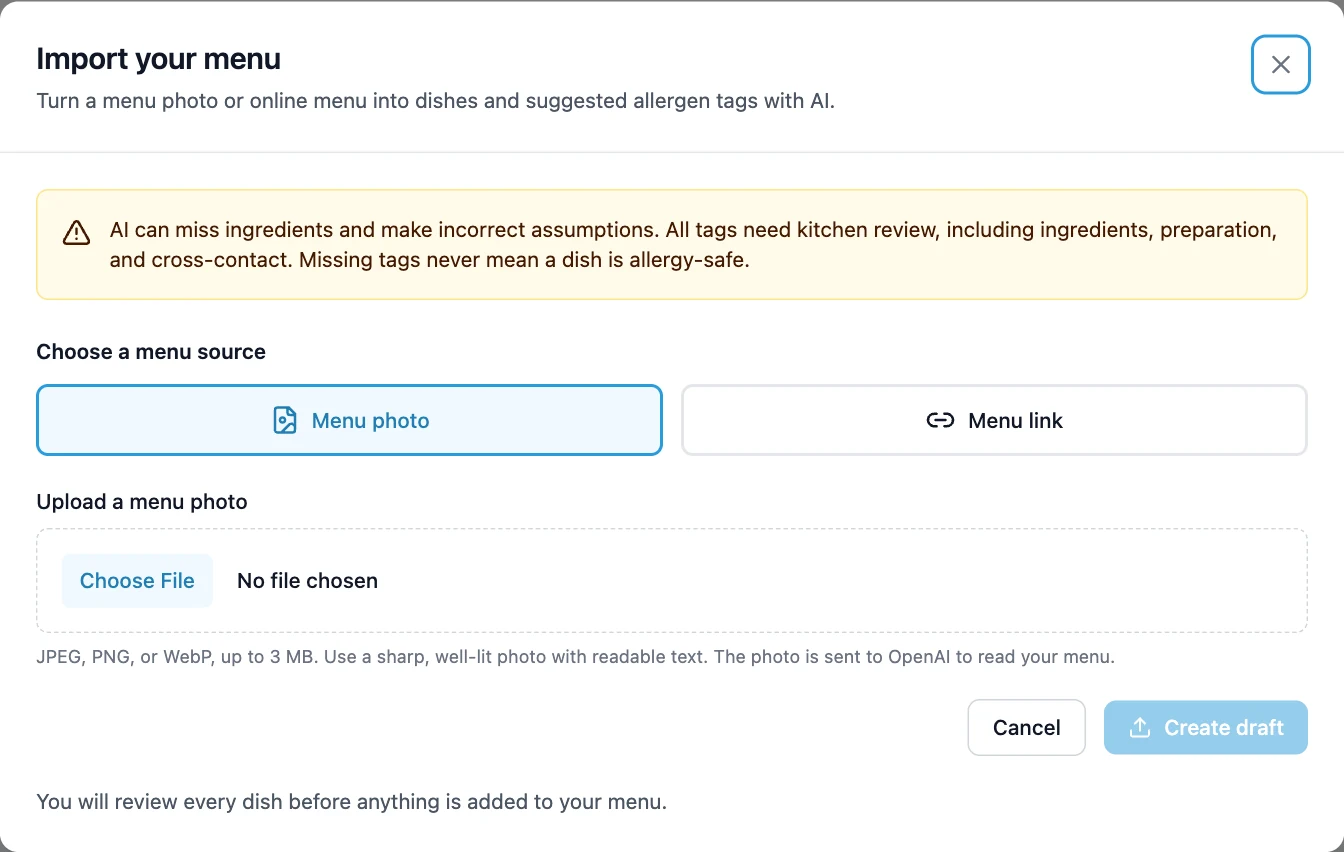
Explore our AI allergen tool preview: turn a readable menu photo or public link into editable dishes and suggested allergens, with evidence beside each suggestion.
- Choose a menu photo or public menu link.
- Review dish details and declared or likely allergens.
- Check the selection with your kitchen before adding it.
Preview feature, not enabled on the live platform yet. Current menus can be created and edited manually. AI cannot verify recipes, determine cross-contact, or guarantee allergy safety.
Restaurant allergy menus,
ready to explore.
See how these restaurants share their dish details and allergen information with guests through MyMeal.




A better menu experience.
Three simple steps.
Make it yours.
Add your restaurant and create dishes in the menu editor. Organize the categories your guests will browse.
Add the details.
Review ingredients, allergen information, preparation notes, and possible modifications with your kitchen.
Welcome your guests.
Share your menu link or QR code so guests can explore and ask more informed questions.
Your hospitality.
Now on the menu.
Allergy questions deserve more than a footnote. MyMeal helps you make the information accessible, so your team can focus on the conversation.
Resources for a more informed serviceA few things
you might ask.
What does the AI allergen tool do?
Our AI-assisted import preview reads a menu photo or public link and prepares editable dishes with suggested allergens and supporting evidence. The workflow requires kitchen review before adding a selection. It cannot verify recipes or guarantee allergy safety. AI import is not enabled on the live platform yet; current menus can be created and edited manually.
See the product preview ↗What is a digital allergy menu?
It is an online version of your menu that includes dish-level allergen information. MyMeal lets guests select allergies and review menu details, including modification and cross-contact notes provided by your restaurant.
Do guests need to download an app?
No. Guests open a menu link or scan its QR code using their phone’s browser. They do not need a MyMeal account to view a public menu.
Can I manage more than one restaurant location?
Yes. MyMeal includes restaurant and location management so you can organize menus for your business.
Does it replace a conversation with restaurant staff?
No. A digital menu shares the information your restaurant provides. It cannot guarantee an allergen-free meal or account for every preparation change. Guests should confirm their needs with staff.
Can I update my menu after sharing it?
Yes. You can edit menu content in the application. Keep the shared menu address stable when making changes so existing links and QR codes continue to point guests to your menu.
Make room for
every guest.
Bring your menu and allergen information together.
Let your hospitality do the rest.
One month free. Then $50/month.
View pricing and trial details ↗