
AI allergen menu analysis can turn a menu photo or online menu into a starting draft of dishes and suggested allergen tags. The restaurant still needs to verify the actual recipes, purchased ingredients, and preparation details before guests rely on the information. A useful AI tool makes that review easier to perform and inspect.
This guide explains how to evaluate a draft, which questions to put back to the kitchen, and how to judge whether information is ready for a guest-facing menu. The examples are illustrative. The MyMeal photo and URL import workflow described here is a product preview; AI import is not currently available in the production service. Manual menu creation and editing are available.
What an AI allergen tool can do for a restaurant
The most useful starting task is organizing information that is already present. A menu contains dish names, descriptions, section headings, prices, and sometimes ingredients. AI can propose structured records from that material so the owner has an editable draft instead of a blank form.
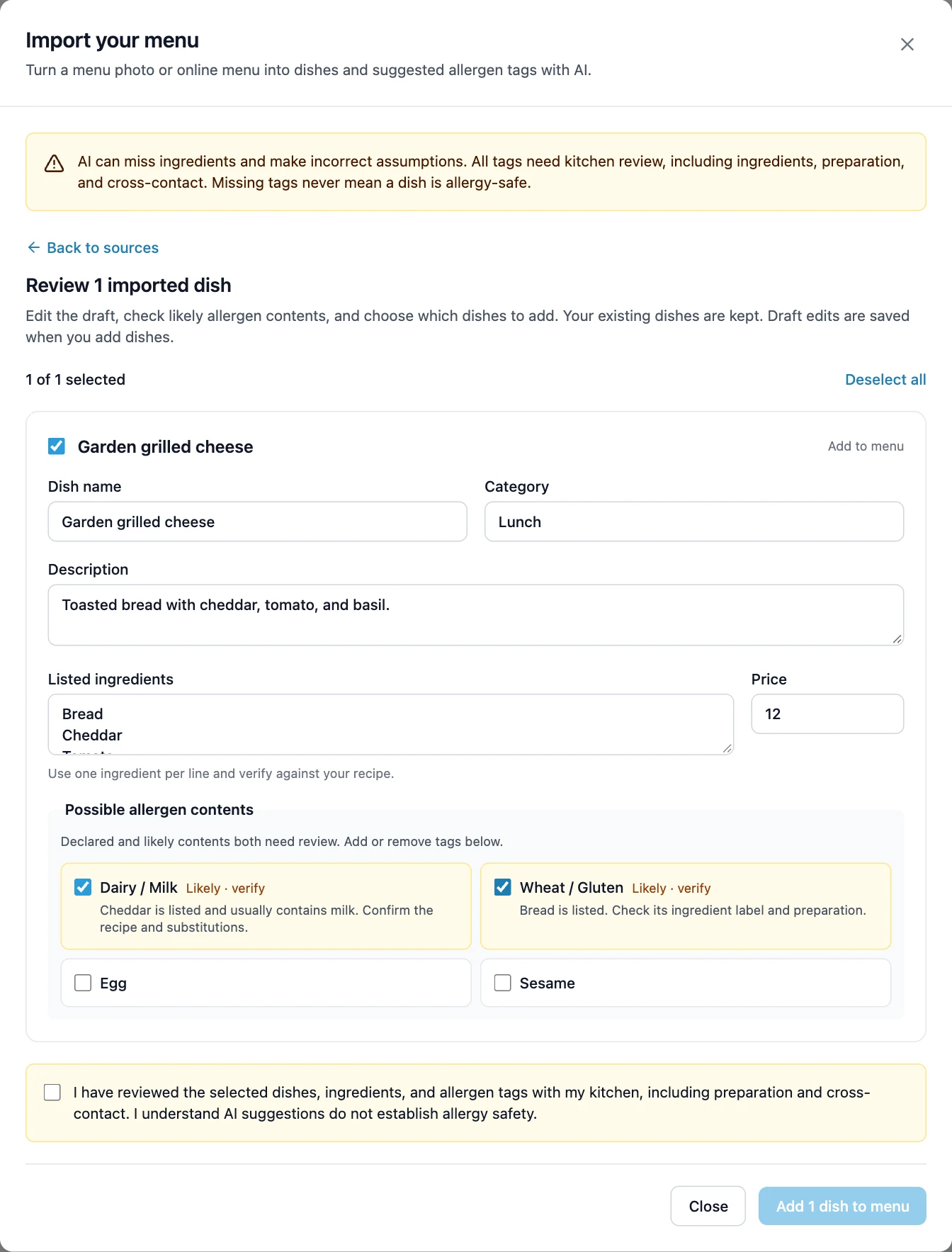
The MyMeal preview accepts a menu photo or public menu URL and prepares dishes with suggested allergen tags. The review interface lets the operator edit fields and choose which dishes to add. Its distinction between explicit and inferred suggestions is important: a source may name an allergen directly, or a suggestion may come from an ingredient or conventional recipe assumption.
Neither kind of suggestion establishes the complete facts of a restaurant dish. A menu description is written to describe a meal, not document every purchased ingredient or preparation step. A photo cannot show the contents of a stock base, and an online description cannot show how the kitchen uses a fryer during service.
Generative AI can produce confident but incorrect output. NIST describes this risk as confabulation and also identifies risks from human over-reliance on AI systems. That is a general AI risk, not a measured error rate for this product. See section 2 of the NIST Generative AI Profile. A restaurant review should check the source even when the draft looks plausible.
Separate what was written from what was assumed
Ask the reviewer to classify each statement before deciding whether to keep it. An ingredient that appears in the source, an allergen association inferred by the tool, and a preparation fact verified by the kitchen have different foundations. Keeping those foundations visible prevents a likely association from being quietly promoted into a confirmed recipe.
| Category | Illustrative example | Review needed |
|---|---|---|
| Source text | The menu explicitly says ‘sesame dressing.’ | Confirm that the imported text belongs to the right dish and reflects the current menu. |
| Inferred suggestion | A conventional recipe association suggests a possible allergen. | Check the actual recipe and current product information; the restaurant may use a different formulation. |
| Kitchen-verified information | The reviewer checks the dressing recipe and purchased components. | Record the basis and ensure the public information matches the reviewed dish. |
| Preparation information | The kitchen describes a shared process relevant to the request. | Review the actual process separately; a written menu cannot establish it. |
| Unresolved information | The purchased sauce’s current specification is missing. | Keep the question open and obtain reliable information rather than treating the missing detail as absence. |
Review explicit suggestions as well as inferred ones. A tool can associate a perfectly legible ingredient with the wrong dish, repeat an outdated source, or interpret a heading as applying more broadly than it does. “Explicit” describes how the suggestion relates to the source; it does not certify the kitchen’s current recipe.
For restaurant owners, the useful review question is: “What record lets us substantiate this statement about the food we serve?” A well-written AI explanation may point you toward that record, but it cannot replace it.
Work through a dish with an ambiguous component
Imagine a menu listing “Roasted vegetable bowl: grains, seasonal vegetables, house dressing, toasted topping.” The text gives the tool a dish and several components. It leaves the dressing and topping unspecified. Any precise assertion about their ingredients would need further evidence.
A reviewer should first confirm that the dish name and description were captured correctly. Next, obtain the current dressing recipe, the topping specification, and the grain product information. Then ask the kitchen about the process relevant to the guest’s request. Do not fill those gaps by choosing the most familiar version of a vegetable bowl.
If the source instead explicitly lists sesame in the dressing, a sesame suggestion has a visible textual basis. The kitchen still needs to check the complete dish and other components. The FDA lists sesame among the nine major food allergens recognized in the United States; see its major-allergen definition. That U.S. list does not mean every guest’s relevant food is represented by one of nine tags.
Suppose the kitchen confirms the dressing is added after assembly and can sometimes be omitted. The owner then needs a separate decision about what a modification note should say. A tool reading a menu cannot establish that the request can be handled on every shift or that other preparation circumstances have been addressed. Describe only what the kitchen has actually reviewed.
A practical review rule: every suggestion needs a source check, every missing detail needs a decision, and every modification needs the kitchen’s confirmation. An untagged dish remains unverified with respect to information that was never checked.
Run a source-by-source review before adding dishes
First, check the import against the menu
Count the items, compare the section order, and inspect similar variants. Check that the tool has not combined lunch and dinner portions, treated a side choice as a separate entrée, or put a shared heading into one dish’s description. Read each price and optional addition beside its source.
Second, check the dish against the kitchen records
Use current recipes and exact purchased-product information. Include sauces, marinades, garnishes, default sides, and add-ons. Confirm which version is being served. If several products are used interchangeably, the reviewer needs a process that accounts for that variation rather than a single convenient label.
Third, inspect every suggested tag and every gap
Read the reason for each suggestion, then compare it with the source records. Correct unsupported assumptions. Also look for omissions: a draft may miss an ingredient, misread a word, or have no information about a component. Removing an incorrect tag does not establish that the remaining record is complete.
Fourth, review preparation and possible modifications
Ask the kitchen which preparation details should accompany the dish and which changes are feasible. Keep this work separate from copying menu text. Record the verified notes in the menu workflow, then check the guest-facing result. The digital allergy menu setup guide covers this wider launch process.
Finally, choose only the records ready to add
In the MyMeal preview, the operator can edit the draft and select dishes before adding them. Use that step to check completeness. If a source is unreadable or a recipe question remains unanswered, resolve it through the restaurant’s process before presenting a claim that depends on it.
Catch common input and review errors
Cropped or low-quality photos. A clear main column can coexist with an unreadable footnote or clipped add-on list. Compare the full source and analyze a clearer, smaller section if needed. Check the menu edge, bottom notes, and text near images.
The wrong URL. A restaurant homepage, seasonal announcement, or delivery summary may not contain the complete current menu. Use the actual public menu page and check what was retrieved. A successful request is not proof that the desired menu was present.
Dietary wording used as a shortcut. Treat “vegan,” “plant-based,” and similar descriptions as claims to understand in context, rather than a complete account of every allergen or preparation circumstance. Verify the actual components and the specific question the guest asks.
Similar names mapped to different ingredients. Keep the restaurant’s terminology precise. A product with a familiar culinary name can use a different recipe, and a broad category can hide important distinctions. Ask the supplier or recipe owner when a label is ambiguous.
Unchecked assumptions carried into new menus. A verified record for one recipe does not automatically apply to a catering variant or a different supplier. Reuse information only when the underlying dish and relevant process match.
Decide what is ready for a guest-facing menu
Set an internal release check: the source menu is current, imported fields have been compared, recipe and purchased-product questions are resolved, tags reflect reviewed information, and preparation or modification notes have kitchen input. Then check the public menu on a phone with a second staff member where practical.
Keep a record of who checked the source and when, using your existing operational process. This guide recommends that record; it does not claim the product supplies an automated approval trail. After launch, connect later substitutions and recipe edits to the same maintenance workflow.
Use AI to reduce transcription work and surface questions for review. Measure it in your own operation by checking whether it produces a useful editable starting point. We do not claim a universal accuracy percentage, a guaranteed setup time, or that AI can determine which meal is safe for an individual guest.
Questions restaurant owners ask about AI allergen tools
Can AI determine all allergens from a menu photo?
A photo can provide only the information visible in it, plus assumptions the tool may make. The restaurant needs current recipes, purchased-product information, and kitchen knowledge to verify the dish. Short descriptions and unlisted components leave gaps.
Does an empty tag list mean the dish contains none of those allergens?
An empty list can mean the source was incomplete or the tool missed something. Review the dish against its actual components. Never treat a missing suggestion as a positive assurance.
Will the tool handle cross-contact or certify our menu?
The AI preview does not establish kitchen cross-contact conditions or certify a dish. Keep those questions with the people responsible for the actual preparation process and your restaurant’s training and procedures.
Can we build a menu while AI import is in preview?
Yes. MyMeal supports manual dish creation and editing. Use the allergy menu builder to maintain reviewed information and share the guest menu. AI-assisted import is a separate preview workflow, not a prerequisite for building a menu.